
鉴权与调用
平台所有 API 使用统一的请求头鉴权方式。本文档涵盖签名生成、多语言调用示例、调用前检查及超时重试规范,业务请求参数仍以 API 详情页为准。
一、鉴权
请求头
| Header | 类型 | 必填 | 说明 |
|---|---|---|---|
appId |
string | 是 | 当前账号的 AppID |
timestamp |
string | 是 | 13 位毫秒时间戳,有效期 2 分钟 |
sign |
string | 是 | MD5(appId + timestamp + appKey),小写 32 位 |
Content-Type |
string | 按接口 | JSON 请求通常使用 application/json |
签名步骤
- 从服务端安全配置中读取
appId和appKey。 - 生成当前时间的 13 位毫秒时间戳。
- 按
appId + timestamp + appKey直接拼接,不加冒号、空格或换行。 - 对拼接结果执行 MD5,输出小写十六进制字符串。
- 将三个值放入请求头,并尽快发起请求。
raw = appId + timestamp + appKey
sign = lowercase(md5(raw))
以下为通用示例代码,实际调用代码可在 API 详情页接口文档中查看。
cURL 示例
APP_ID="your-app-id"
APP_KEY="your-app-key"
TIMESTAMP="$(date +%s%3N)"
SIGN=$(printf '%s' "${APP_ID}${TIMESTAMP}${APP_KEY}" | md5)

curl -X POST "https://your-api-host.example.com/replace-with-api-path" \
  -H "appId: ${APP_ID}" \
  -H "timestamp: ${TIMESTAMP}" \
  -H "sign: ${SIGN}" \
  -H "Content-Type: application/json" \
  -d '{"yourField":"yourValue"}'
macOS 自带
md5命令;Linux 环境请替换为md5sum | awk '{print $1}'。
Java 示例
import java.net.URI;
import java.net.http.HttpClient;
import java.net.http.HttpRequest;
import java.net.http.HttpResponse;
import java.nio.charset.StandardCharsets;
import java.security.MessageDigest;

public class ApiAuthDemo {

    public static void main(String[] args) throws Exception {
        String appId = "your-app-id";
        String appKey = "your-app-key";
        String timestamp = String.valueOf(System.currentTimeMillis());

        // 签名:MD5(appId + timestamp + appKey),小写 32 位
        String raw = appId + timestamp + appKey;
        String sign = md5Hex(raw);

        String body = "{\"yourField\":\"yourValue\"}";

        HttpClient client = HttpClient.newHttpClient();
        HttpRequest request = HttpRequest.newBuilder()
                .uri(URI.create("https://your-api-host.example.com/replace-with-api-path"))
                .header("appId", appId)
                .header("timestamp", timestamp)
                .header("sign", sign)
                .header("Content-Type", "application/json")
                .POST(HttpRequest.BodyPublishers.ofString(body, StandardCharsets.UTF_8))
                .build();

        HttpResponse<String> response = client.send(request, HttpResponse.BodyHandlers.ofString());
        System.out.println(response.statusCode());
        System.out.println(response.body());
    }

    private static String md5Hex(String input) throws Exception {
        MessageDigest md = MessageDigest.getInstance("MD5");
        byte[] digest = md.digest(input.getBytes(StandardCharsets.UTF_8));
        StringBuilder sb = new StringBuilder();
        for (byte b : digest) {
            sb.append(String.format("%02x", b));
        }
        return sb.toString();
    }
}
以上示例使用 JDK 11+ 内置
HttpClient,无需额外依赖。
Python 示例
import hashlib
import time
import requests

app_id = "your-app-id"
app_key = "your-app-key"
timestamp = str(int(time.time() * 1000))
sign = hashlib.md5(f"{app_id}{timestamp}{app_key}".encode("utf-8")).hexdigest()

response = requests.post(
    "https://your-api-host.example.com/replace-with-api-path",
    headers={
        "appId": app_id,
        "timestamp": timestamp,
        "sign": sign,
        "Content-Type": "application/json",
    },
    json={"yourField": "yourValue"},
    timeout=10,
)
print(response.status_code, response.text)
常见鉴权失败原因
- 使用了登录密码代替
AppKey。 - 拼接时增加了分隔符、空格或换行。
- 时间戳不是 13 位毫秒值,或客户端与服务器时间相差过大。
- MD5 结果使用了大写字母。
- API 尚未申请成功,或额度已用尽。
- 请求来自未加入白名单的出口 IP(如设置了白名单)。
- 密钥已被重置,程序仍使用旧密钥。
- 账号未完成个人认证或企业认证:目标 API 要求实名认证而账号尚未通过审核,需先在
账号管理 / 实名认证完成认证。
密钥安全
禁止将 AppKey 放在前端 JavaScript、移动端安装包、公开仓库、日志、截图或 URL 查询参数中。若怀疑泄露,应立即联系技术支持重置密钥;重置后旧密钥立即失效。
二、调用
API文档查看
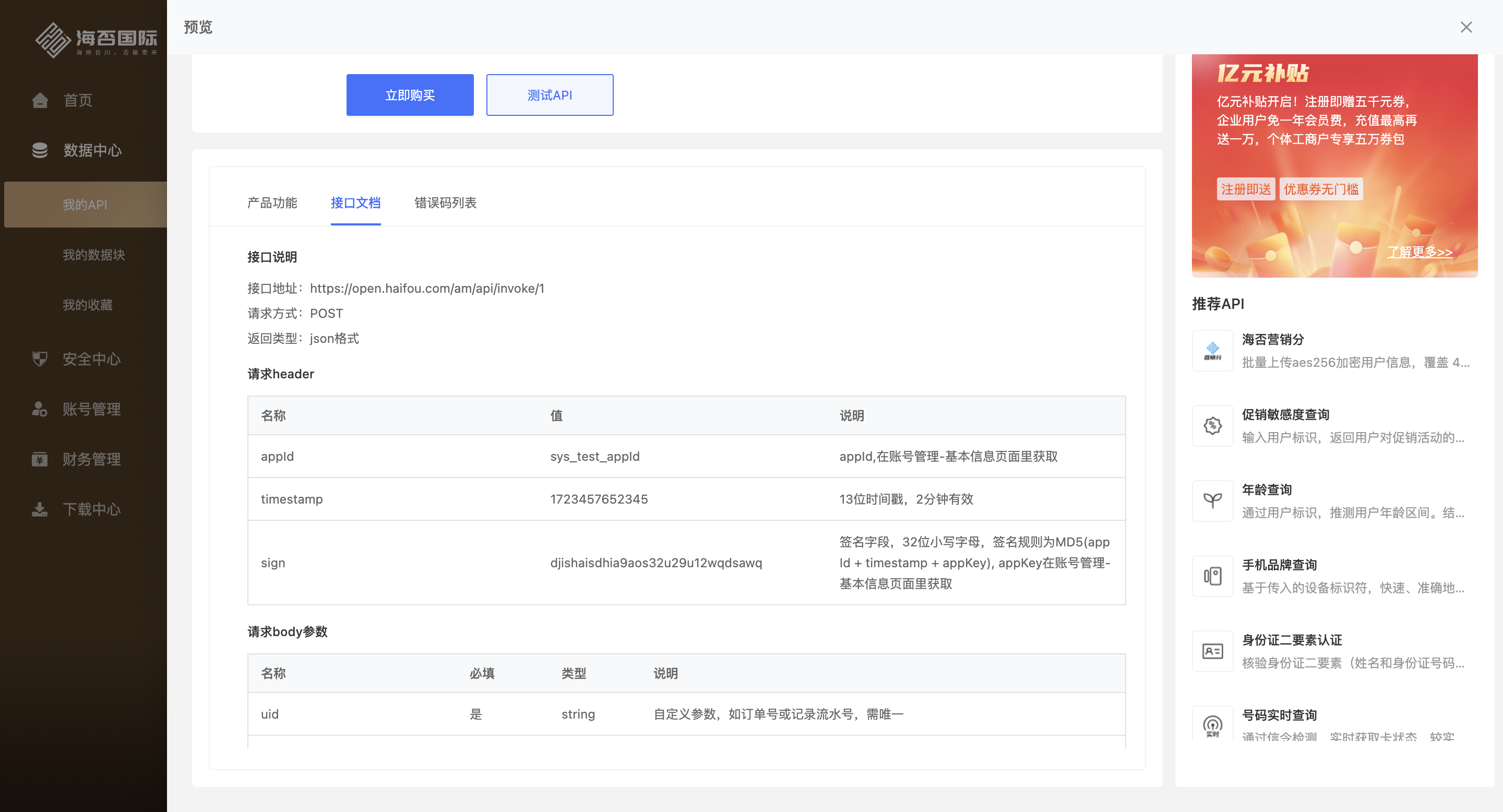
入口:数据中心 / 我的API ,点击单个API模块的 “文档” 按钮。
在接口文档标签页,可查看API的接口地址、请求方式、请求参数、返回参数、调用示例详细说明。
调用前必须确认
- 已申请目标 API 权限。
- 已购买套餐且剩余额度大于 0。
- 已完成目标 API 所需的实名认证(个人认证或企业认证)。未认证账号只可试用部分基础 API,付费及企业专用 API 需认证通过后方可调用。
- 已阅读该 API 的独立文档。
- 已确认请求方式、URL、参数类型和编码格式。
- 已准备服务端出口 IP;如启用 IP 白名单,已完成放行。